What Actually Works to Get Selected as a Shein Product Tester
Por: Lucas Bastos em Última atualização em:
Anúncios
Free Trial Center Strategy: Tips to Improve Your Selection Rate
Available spots are strictly limited. Using the wrong approach will lead to your profile being skipped. Follow these verified steps below.
Independent Information Guide This review is based on public information about Shein's Free Trial Center. We have no commercial partnership or official link with the brand. Screening is competitive and acceptance is never guaranteed. Check specific terms for each round before applying.
Why Most Applications Get Denied
The review team handles thousands of weekly entries. Many applicants get rejected because they leave their profile empty, miss submission deadlines, use shipping addresses outside their store region, or provide brief reviews without images after receiving products.
To build a strong profile within the platform, follow a steady routine: provide your body measurements, submit requests as soon as new rounds launch, and write thorough reviews every single time. Selection criteria remain very competitive.
What Is the Product Trial Program?
This area serves as Shein's official quality evaluation program. Chosen shoppers receive free merchandise in exchange for writing an honest review based on real wear. When an application is approved, a zero-dollar order is automatically created and shipped.
Slots are capped and reset on a regular schedule. No applicant is pre-approved; your overall platform activity, how quickly you apply, and the quality of your past reviews all determine your chances for upcoming selections.
Popular Product Categories Available
The trial inventory spans several consumer categories. With inventory rotating on a weekly basis, the catalog features both trending styles and daily wardrobe staples available for testing.
Beyond classic fashion apparel, the showcase often highlights skincare essentials, beauty accessories, household storage items, and modern home decor.
Featured Catalog Categories:
Access the Trial Center
Sign in to your account via the website or mobile app and head to the testing area. On mobile, tap: Profile → More Services → Other Services → Free Trial Center. Browse the items available for the current weekly cycle.
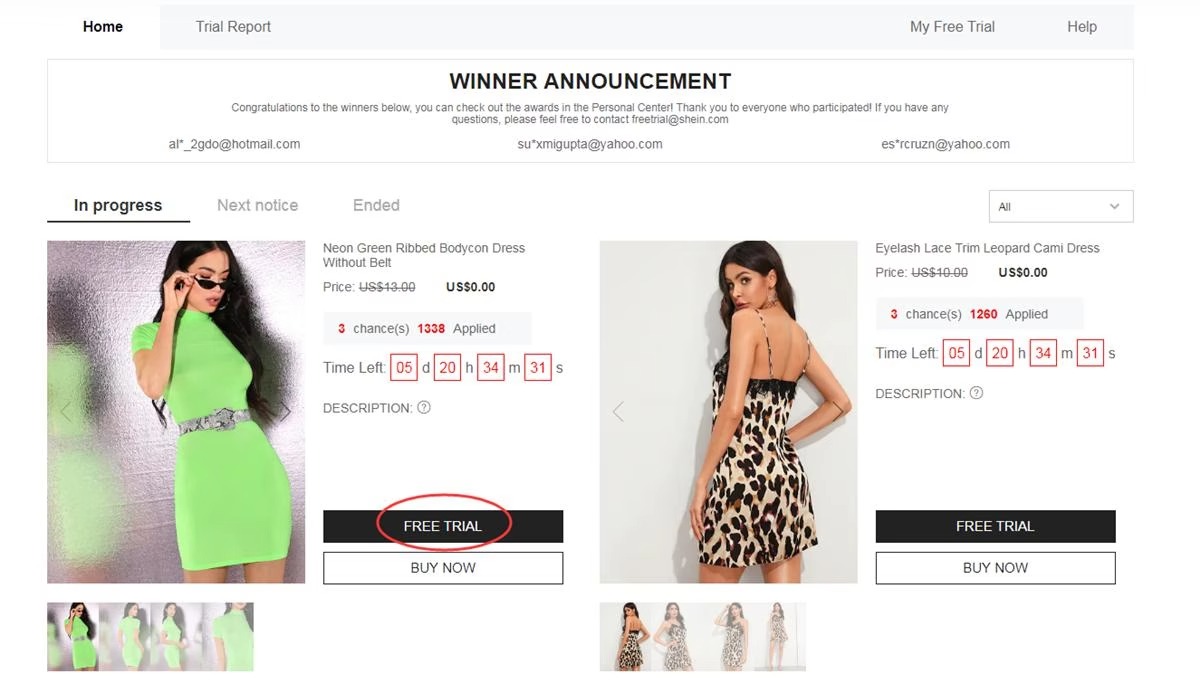
Official navigation route within the account services menu
Choose Up to 3 Weekly Items
You are limited to 3 picks every seven days (unused slots expire and do not roll over). Select the trial item, pick your exact size, verify a delivery address inside your current regional store, and submit. Mismatched regions will cause an immediate cancellation.
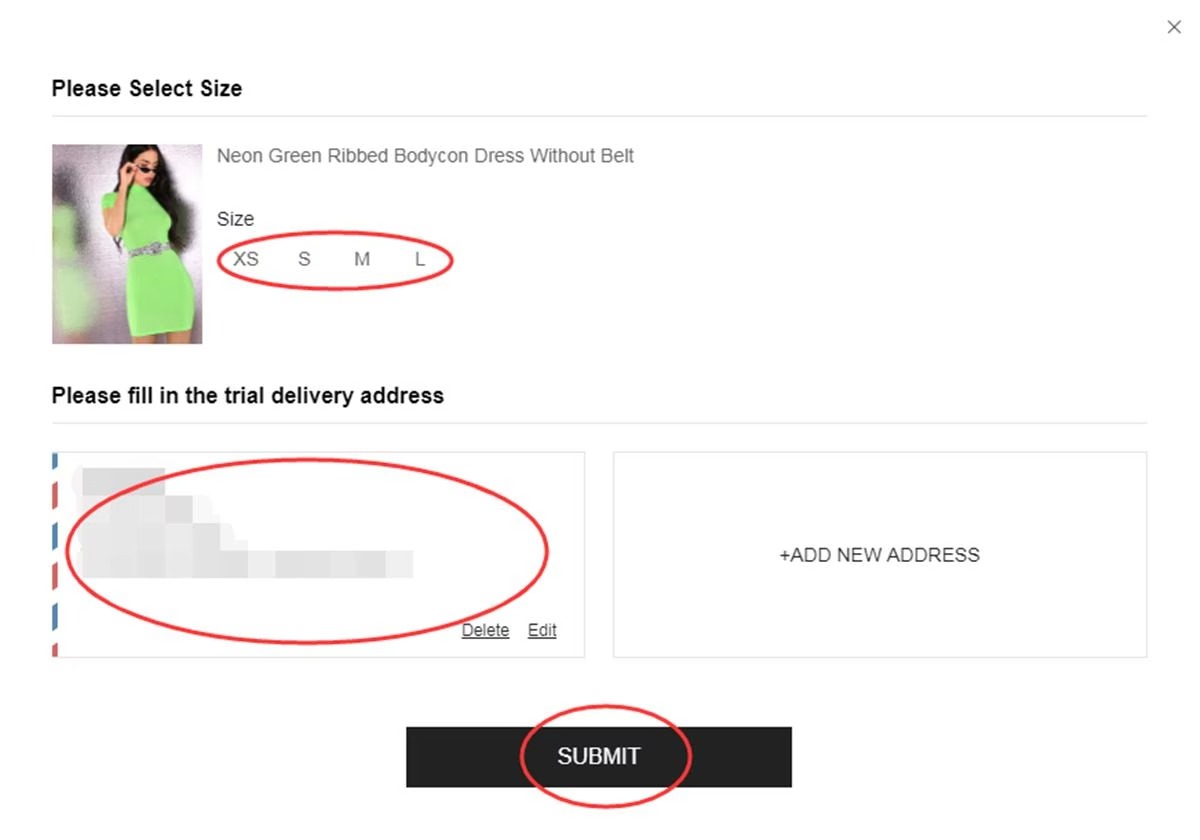
Size verification step and regional shipping address check
Track Your Application Status
Decisions generally take around one week to process. Visit "My Free Trial / My Applications" to check your status. An "Approved" tag means you were selected and your package is on its way; "Failed" indicates your request was not chosen this round.
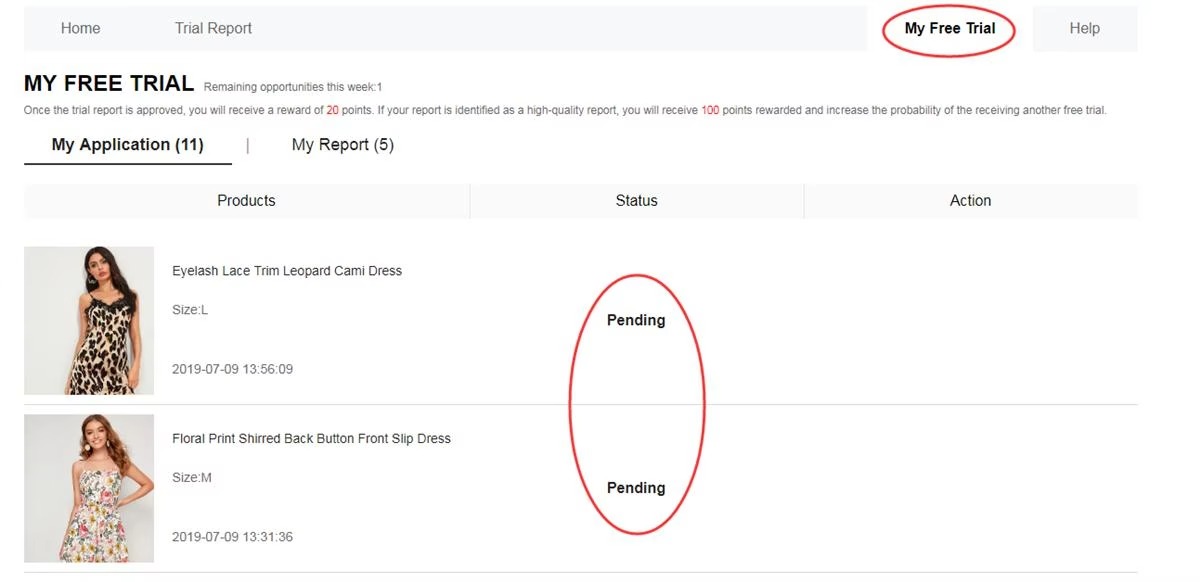
Account dashboard for tracking review selections and outcomes
Submit Your Review Within 10 Days
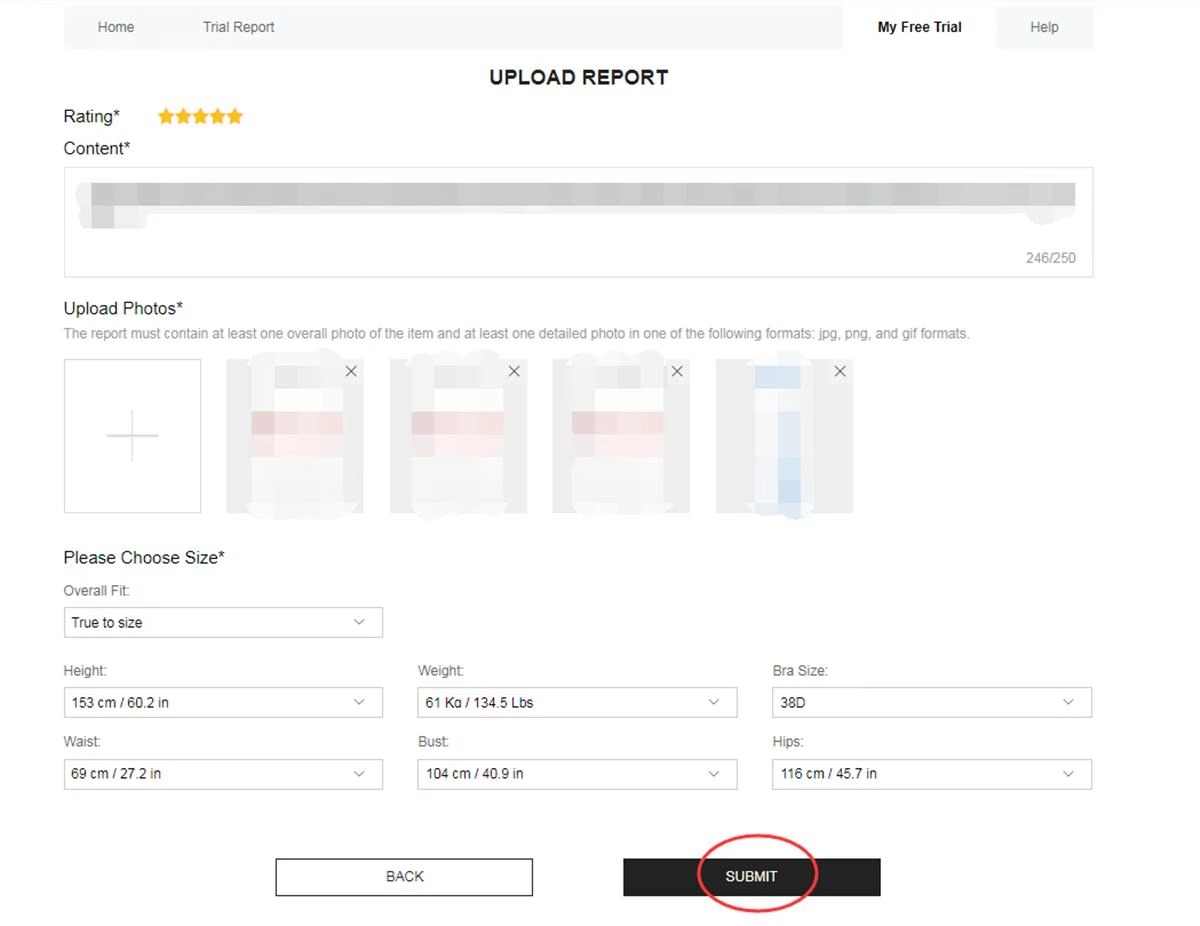
Once delivered, wear the item in daily life to evaluate fabric, craftsmanship, fit, durability, and comfort. Write a detailed review with sharp photos (one full-body shot and two close-ups recommended). Submit via the report button under "My Report" before day 10.
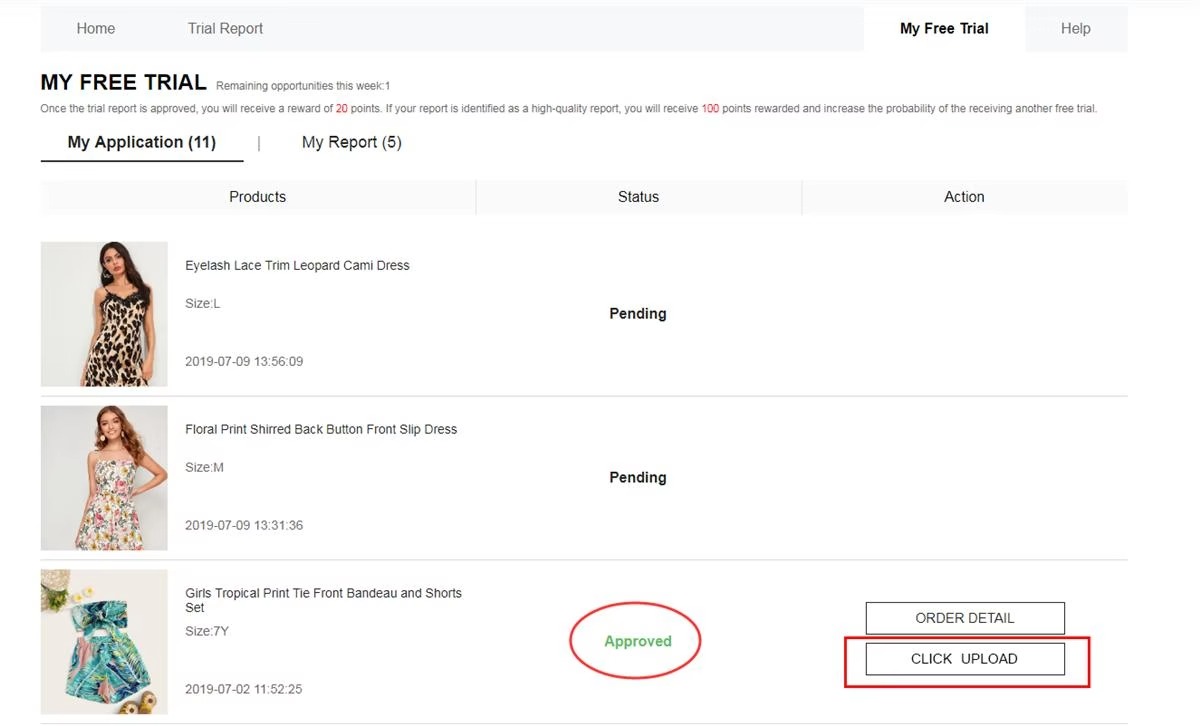
Official submission page used for uploading written reviews and photos
Check My Report and Point Earnings
Once your review is sent, open My Report to verify your submission was logged. An accepted review typically grants 20 reward points. If marked as a Quality Report, official rules specify a bonus of 100 extra points. These points do not guarantee future picks; they just reflect your activity.
Review status dashboard showing completed reports and earned points
Edit Your Review If Marked Failed
If your submitted report is marked as Failed, platform guidelines usually offer an extra chance to revise it. Inside My Report, tap Rewrite. Use this to expand your text (quality, fit, cut, and fabric), replace blurry photos, and resubmit on time. Never skip fixing a rejected report, as it may impact future selections.
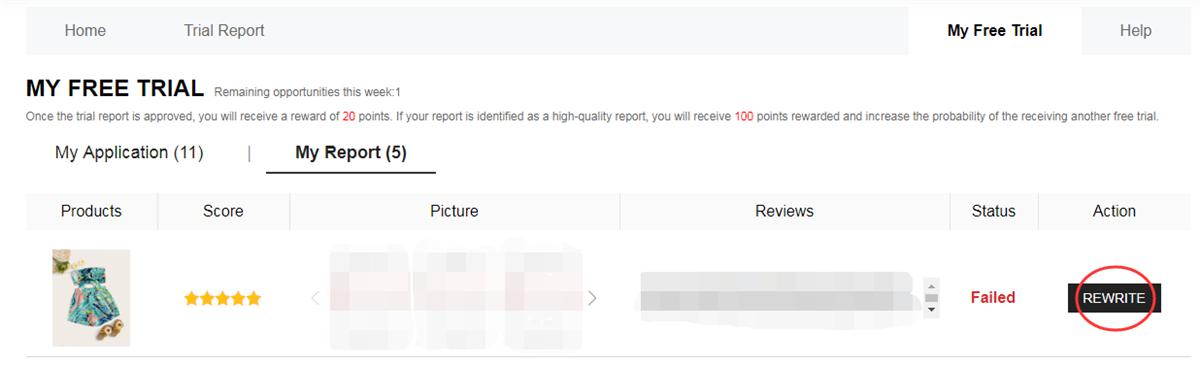
My Report screen displaying Failed status and Rewrite prompt
Key Elements of a Helpful Review:
To meet moderation standards and pass review screening, successful entries should include:
Reward Structure: A standard approved review adds 20 points to your account balance. If your post earns the "Quality Report" badge, you receive a special bonus of 100 reward points toward future orders.
Common Mistakes That Hurt Your Odds
Avoid these routine errors to protect your internal profile standing:
❌ Leaving your account profile incomplete or missing updated sizing data
❌ Entering a shipping address located in a different region than your active store
❌ Submitting entries late instead of right when weekly cycles open
❌ Submitting brief, vague comments without helpful details or real images
Anúncios
❌ Missing the mandatory 10-day deadline to upload your required report
❌ Leaving a Failed report unedited when the Rewrite feature is offered
❌ Staying inactive on the app for weeks and returning only to request items
Anúncios
“I used to apply randomly and received rejections every single week. Everything changed once I got organized: I filled in my profile sizes, sent requests right when rounds opened, verified my regional address, and submitted detailed reviews with clear photos on time. Approvals happen regularly now.”
— Camila R., active program participant ⭐⭐⭐⭐⭐
Key Rules You Must Keep in Mind
• Maximum limit of 3 applications per week (unused entries do not carry over).
• Your shipping destination must match the specific country of your active store.
• Standard shipping is covered by the brand; local import taxes may apply depending on your region.
• Every review must be submitted within 10 days of package delivery.
• If a review receives a Failed status, you are often granted one Rewrite opportunity.
• Submitting inaccurate information or using multiple accounts on one device can lead to bans.
• Missing review deadlines will directly lower your chances for future selections.
Frequently Asked Questions (FAQ)
Do I have to pay for shipping on trial items?
No, standard delivery fees are completely covered. Participants are only responsible for potential customs clearance duties or import fees set by their local authorities.
How many items can I apply for each week?
You can pick up to 3 separate products per weekly cycle. Any unused selections simply expire and will not carry over to the next period.
What happens if my review gets rejected?
Your review status in My Report may read Failed. A Rewrite button is usually available to edit your text, upload better photos, and resubmit. Check all image and text guidelines before sending it again.
Do I need to send the products back after testing?
No. Under regular trial guidelines, the items are yours to keep once your required review is submitted and passes moderation. Be sure to check individual rules for each campaign.
Popular products run out of applicant slots quickly. Consistent testers make it a habit to check the dashboard early, submit choices quickly, and deliver, or promptly revise, reviews within deadlines.
Visit the Official Free Trial Center
Explore this week's open selections, submit your entries properly, and keep track of your requests.
GO TO FREE TRIAL CENTER NOWYou will be directed securely to the platform's official trial area.
Reference and customer support: Shein Free Trial Help Center