Independent informational guide — Based on public resources provided in Shein’s Free Trial Support Center. We are not affiliated with Shein. Candidate selection is competitive and approval is never guaranteed. Always review official campaign terms.
If you have explored the Free Trial portal and felt confused about how entry works — you are not alone. The overall system becomes clear once you understand the sequential flow.
Here is an easy-to-follow overview of how users submit entries, monitor status updates, and post feedback. While selection relies on algorithm criteria, adhering to proper guidelines prevents common mistakes that disqualify applicants early.
1
Access the Free Trial Hub
Sign in to your Shein profile. Inside the mobile app, head to your account tab → More Services (or Other Services) → Free Trial Center. On desktop browsers, locate the Free Trial option under community or service links.
Explore the active product inventory. Available items refresh frequently, meaning current choices may update soon.
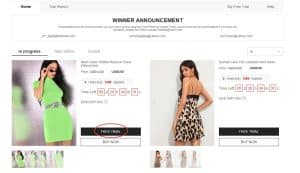
Demonstration path into the Free Trial Hub (official help graphics)
2
Request up to 3 entries per week
Accounts receive 3 entry attempts weekly. Unused allowances do not roll over into the following week.
When you find an item you wish to review:
- Tap Free Trial on the desired product page
- Select your accurate size
- Confirm that your destination address matches the same region as the regional Shein site you are using
- Click Submit
Note: If the destination country differs from the regional portal, your entry may be rejected. Re-verify your details before confirming.
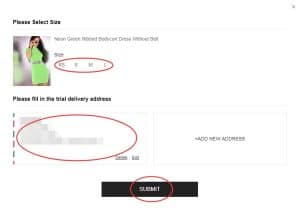
Sizing and address verification screen (from Shein help workflow)
3
Track progress under My Free Trial
Review periods generally take about one week. Visit My Free Trial / My Applications to check your current status:
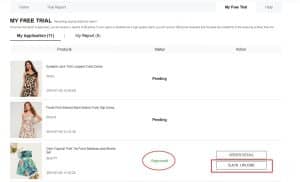
- Approved — your entry was chosen. A zero-cost order is generated and processed for delivery.
- Failed — that particular submission was not selected. You can re-apply for new items during the next cycle.
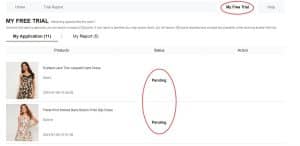
Status dashboard for Approved or Failed outcomes
4
If selected, test the item and post feedback
Should your application be chosen and arrive, try on the garment to evaluate fabric texture, sizing accuracy, structure, and quality.
Then upload an authentic, thorough review via your account portal — ideally within 10 days of delivery. Monitor your submissions under My Report.
Elements that improve review quality:
- Honest pros and cons (avoid purely generic praise)
- Sharp, clear photographs — preferably a full view plus close-ups of material details
- Specific feedback regarding fit, comfort, and real-world wearability
Feedback upload interface (official reference visual)
Reward points: An accepted evaluation can earn roughly 20 points. High-quality reviews may grant an additional 100 extra points.
If your initial submission is rejected, you may receive one second chance to make corrections and re-submit.
Key guidelines to keep in mind
• Limit of 3 submissions per week (unused entries reset)
• Address must correspond to the regional domain of the Shein store used
• Standard shipping is handled by Shein; import fees or duty taxes depend on your country
• Aim to publish your review within 10 days following arrival
• Duplicate or fraudulent profiles risk suspension from the program
• Failing to submit required reviews can lower future selection chances
Frequent errors that hurt approval chances
❌ Incomplete profile details or selecting inaccurate sizing
❌ Shipping addresses outside the active website region
❌ Submitting late when popular item candidate pools have filled up
❌ Vague, brief reviews lacking clear photo proof
❌ Exceeding the review submission deadline
❌ Registering secondary accounts to gain extra entries
Frequently asked questions
Is delivery free for selected items?
In standard Free Trial cases, Shein covers standard delivery costs. Depending on regional laws, local customs duties may apply.
How many requests can I make each week?
Up to 3 submissions weekly. Unused entry slots do not carry forward.
Do I get to keep the item if chosen?
Yes. If you are selected and successfully complete the required product review, the item remains yours.
How long does candidate selection take?
Typically around one week. You can monitor Approved or Failed statuses under My Applications.
What if my review submission is turned down?
You are generally given one opportunity to revise and resubmit. Review guidelines carefully regarding photos and detail.
Do I need a large social media following?
No. Detailed reviews, consistent participation, and account accuracy carry far more weight than follower count.
That summarizes the process: enter the Free Trial section → apply (max 3/week) → await results → if chosen, receive the product → post an authentic review with photos. Keep profile details current, apply early when items renew, and fulfill review obligations.
Ready to explore available trial items?
Check current offerings and submit your entries using the guidelines above. Selection is determined by official campaign criteria.
GO TO FREE TRIAL CENTER NOW
You will be navigated to Shein’s official Free Trial Center.
Source reference: Shein Free Trial Help Center